

The Briefcase #66: What Did Accountants Use Before Excel?
Written by: AccountingCPD | Published: 13th Nov 2026 | Updated: 13th Nov 2026
It might seem strange, but there was a world before Excel. In fact, many of the creation myths across world religions don’t even mention it. There’s very little said in the Bible about Adam and Eve arranged their finances, let alone what kind of software they were using.
This might be because Excel only arrived in 1985, when the world was pretty well established. By that point in history, the Roman Empire had risen and fallen, Christopher Columbus had discovered America, and Cliff Richard had released Bachelor Boy.
Also by that point, electronic spreadsheets had already transformed the way businesses worked. Some had millions of users, and one piece of software had become so dominant that, for a while, replacing it seemed as likely as forgetting to listen to Mistletoe and Wine in December.
So this week, we’re remaining firmly in the computer age, where we belong. Let’s look at some of the lost software from the digital ascendancy.
🟩 VisiCalc
The modern computer spreadsheet story starts in 1979 with VisiCalc, created by Dan Bricklin and Bob Frankston for the Apple II. Bricklin had watched a Harvard Business School lecturer build a financial model on a blackboard, then erase and recalculate figures whenever an assumption changed. He wondered whether a computer could do that instead.
VisiCalc looked surprisingly familiar. There were rows and columns, cells such as A1 and B1, formulas referring to other cells, ranges, and the ability to copy calculations while adjusting references automatically. Most importantly, you could build a model once, change a few numbers later and let the computer recalculate everything affected.
Today, this is roughly the minimum requirement before we will dignify something with the word “spreadsheet”. Earlier financial-modelling systems existed, but many ran on expensive shared computers. VisiCalc put that kind of power onto a relatively affordable personal machine, and it allowed for dull bulbs like business execs to build models.
It became so useful that people bought Apple IIs specifically to run it, which is like buying a TV specifically to watch Countdown.
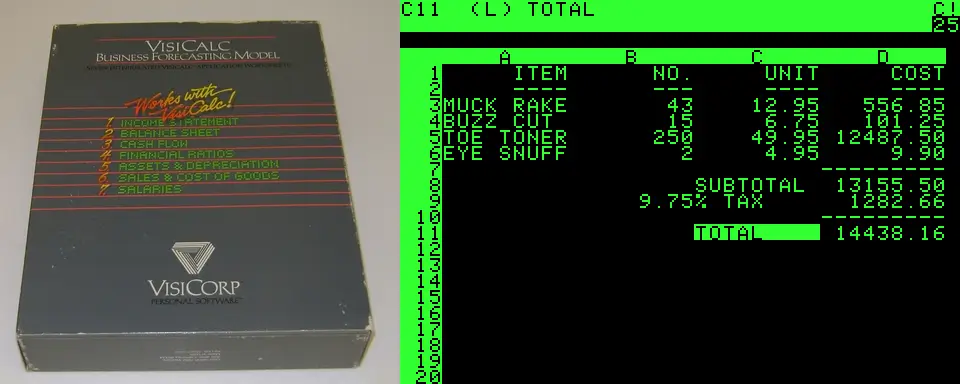
Sources: computerhistory.org, apple2history.org
🟦 SuperCalc
VisiCalc didn’t remain alone for long. SuperCalc appeared in 1980, initially for computers running CP/M, and was bundled with the Osborne 1 portable computer. “Portable” was doing quite a lot of work there – the Osborne weighed around 11 kilograms, the same as a one year old baby.
SuperCalc introduced some impressive features of its own, including iterative calculations for circular references, while later versions added split-screen working and increasingly sophisticated graphics. It eventually attracted more than a million users – a small but devoted following.
🟥 Multiplan
Microsoft launched Multiplan in 1982 as a competitor to VisiCalc and released it for everything – from CP/M and MS-DOS to the Commodore 64, Apple II and various Unix systems.
In fact, Microsoft produced so many versions that Bill Gates later suggested this was part of the problem. There were reportedly around 100 different ports, while rival Lotus (we’ll get to them later) concentrated much more effectively on the rapidly growing IBM PC market.
Multiplan sold more than a million copies, but that’s simply not enough to make a dent. It did leave one small legacy that survives in Excel today, though – Microsoft used R1C1-style cell references rather than VisiCalc’s now-familiar A1, B2 and C3 system. Excel eventually adopted A1 as the default, but you can still switch R1C1 references on if you are feeling nostalgic, or if you want to feel confused and a bit alienated.
🟨 Lotus 1-2-3
Then, on 26 January 1983, Lotus 1-2-3 arrived. Created by Mitch Kapor and Jonathan Sachs, it was designed specifically to take advantage of the IBM PC. While VisiCalc had largely been carried across from older machines, Lotus was written to make use of the PC’s greater memory and wider screen. Sachs reportedly rewrote it in assembly language to squeeze as much performance from the machine as possible.
The name came from its three main capabilities – spreadsheet calculations, graphics and database functions. Software naming was admirably direct in the 1980s. If it launched today, it would presumably be called Lotus SynergyCloud Finance Intelligence Pro+ and demand a subscription.
It was enormously successful. Lotus sold around 175,000 copies in its first year, and by 1988 had sold about 3.5 million. Some manufacturers actually advertised their machines on the basis that they were “1-2-3 compatible”.
And accountants were very much part of that success. A 1990 survey of American Institute of Certified Public Accountants members found that 62% of spreadsheet users were using Lotus 1-2-3, with 93% of those users saying they would recommend it to others. That’s the kind of user feedback modern developers would dream of, before loading their software with AI chatbots and a “premium” version.
Lotus 1-2-3 developed an entire ecosystem around it. Businesses built models and processes in Lotus, while outside companies produced training, books, add-ins, macros and specialised financial tools. Once people had invested years learning how to use it and companies had accumulated thousands of .WK1 files, moving to something else was not an especially attractive proposition.
There were even some wonderfully 1980s technical arrangements. Early PCs could use separate monochrome and colour graphics displays, and Lotus supported a setup where the spreadsheet appeared on one monitor while a graph appeared on another. Which might not seem revolutionary now, but back then, if you walked in on someone with two monitors, you’d probably start screaming.
Lotus was dominating the market. But you’re not using it now, are you?
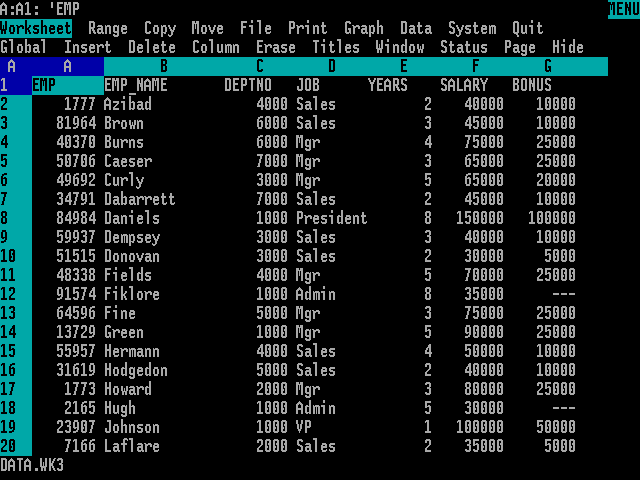
Lotus 1-2-3 on MSDOS
🟢 The big dog
Microsoft released Excel 1.0 in 1985. Weirdly, they released it on the MacIntosh, which feels a bit like if Mario debuted on the Playstation.
The first Windows version followed a couple of years later, and Excel was designed around the increasingly graphical way people were beginning to use computers. Instead of relying so heavily on memorised keyboard commands, users could work with pull-down menus, windows and a mouse, while formatting and charts became much more visual. The mouse was a pretty exciting bit of tech back then, and it was pretty rogue to build a system that relied so heavily on it.
Lotus, meanwhile, was enormously successful in the DOS world. Millions of people already knew how to use it, businesses had processes built around it and entire ecosystems of training, macros and add-ons had grown up around 1-2-3.
But Microsoft kept building Excel around the graphical future. By 1990, it was part of Microsoft Office alongside Word and PowerPoint. Excel 4 followed in 1992 with features such as AutoFill, and Excel 5 in 1993 introduced VBA, giving users a powerful way to build macros and automate their work.
A war was raging! Naturally, you know the victor, but, if things had gone the other way, you could just as well be speaking Lotus now.
📉 The final battle
As Windows became increasingly important in the early 1990s, Excel gained ground. Lotus did eventually move 1-2-3 onto Windows, but it had to bring with it years of existing files, macros, user expectations and compatibility requirements.
Despite many businesses being moulded around Lotus 1-2-3, Excel continued to grow, helped by Windows and the wider Microsoft Office ecosystem. By the mid-1990s, it had overtaken Lotus as the dominant spreadsheet. IBM bought Lotus in 1995, and 1-2-3 continued for many years afterwards, but its period at the top was over. The lotus had wilted.
🧠 Final thoughts
Lotus once looked every bit as entrenched as Excel does now. Businesses had years of models, macros, training and processes tied up in it. Then computing changed, Microsoft backed a different kind of interface, and the default changed with it.
Before any of these programs, accountants managed with paper spreadsheets, which is actually crazy to think about. So, if Excel eventually joins Lotus in the software history books, accountants will adapt again. There is nothing that can stop accountants – there will always be accountants.
💡 Want to learn more about Excel and gain some CPD hours?
Check out all our CPD on Excel. From forecast modelling, to using AI tools in to improve your spreadsheets.

Ready to power up your CPD?


Updated 13th Nov 2026 | 7 min read